- Who we are
Who we are

Over 100 industry awards, accolades, and achievements showcase our quality and commitment to client success.
- Services
Services
Technologies
- On Demand App Solutions
Who we are
Trusted by 500+ active clients.
- Contact Us


 +971 4 2417179
 +971 52 181 0546
 info@branex.ae

Wait and think for a second…
Your online store is growing, but every time you try to launch a new campaign, update a page, or enter a new market, your entire platform buckles under the incoming traffic load.
Well, it seems like you’re not just fighting competitors, you’re wrestling with your own technology.
This isn’t a hypothetical. As Gartner predicts, 73% of digital leaders say their current eCommerce platform struggles to keep pace with evolving customer expectations.
Meanwhile, brands have adopted modern & agile architectures reporting up to 300% up-speed in marketing new features which ultimately results in lifting conversion rate by 20%.
The buzzword at the center of this revolution is “headless.”
Headless eCommerce bring promises of unparalleled speed, omnichannel freedom and future-proof flexibility for CMOs, CTOs and CEOs who are asking this multi-million dollar question:
“Is headless eCommerce truly worth the investment, or is it just over-engineered hype?”
It’s a dilemma for brands scaling DTC brands and hitting the limits of monolithic platforms like Shopify Plus, Adobe Commerce or for enterprise retailers struggling with legacy systems.
They have seen the case studies from Nike, Peloton and Burberry, but they have also heard whispers of ballooning costs, developer dependency and have faced implementation nightmares.
Today, we are going to cut through the hype and discuss all that we know about headless eCommerce. Who knows going headless in commerce can be your next key to winning big.
Table of Contents
What Is Headless eCommerce?
Think of a traditional eCommerce platform (like Shopify, Magento, or BigCommerce in their standard form) as a tightly packaged all-in-one restaurant. The kitchen (backend), the dining room decor (frontend), and the waitstaff (the logic connecting them) are all part of a single, pre-built system. Want to change the wallpaper? You might have to temporarily close the kitchen.
It decouples the two core parts of any online store:
- The Backend (The “Body”): This is the engine room which houses product database, inventory management, shopping cart, payment processing and all the business logic. Its job is simply to manage and serve data.
- The Frontend (The “Head”): The frontend is the customer-facing presentation layer. It includes the website, mobile app, or any other digital touchpoint. It sets the aesthetic, feel and interactive experience.
Instead, they communicate through a set of APIs (Application Programming Interfaces). You can think of APIs as universal translators and waiters. The frontend which is designed on React can simply “asks” backend for data (“I need product details for item #123”) via an API call, and the backend instantly “serves” that data in a clean, structured format, no matter where the request came from.
Want to learn about the best eCommerce mobile app features to make your eCommerce mobile app standout?
Read More: 10 Advanced Mobile App Features to Differentiate Your Brand
How is Headless eCommerce Different from Traditional eCommerce?
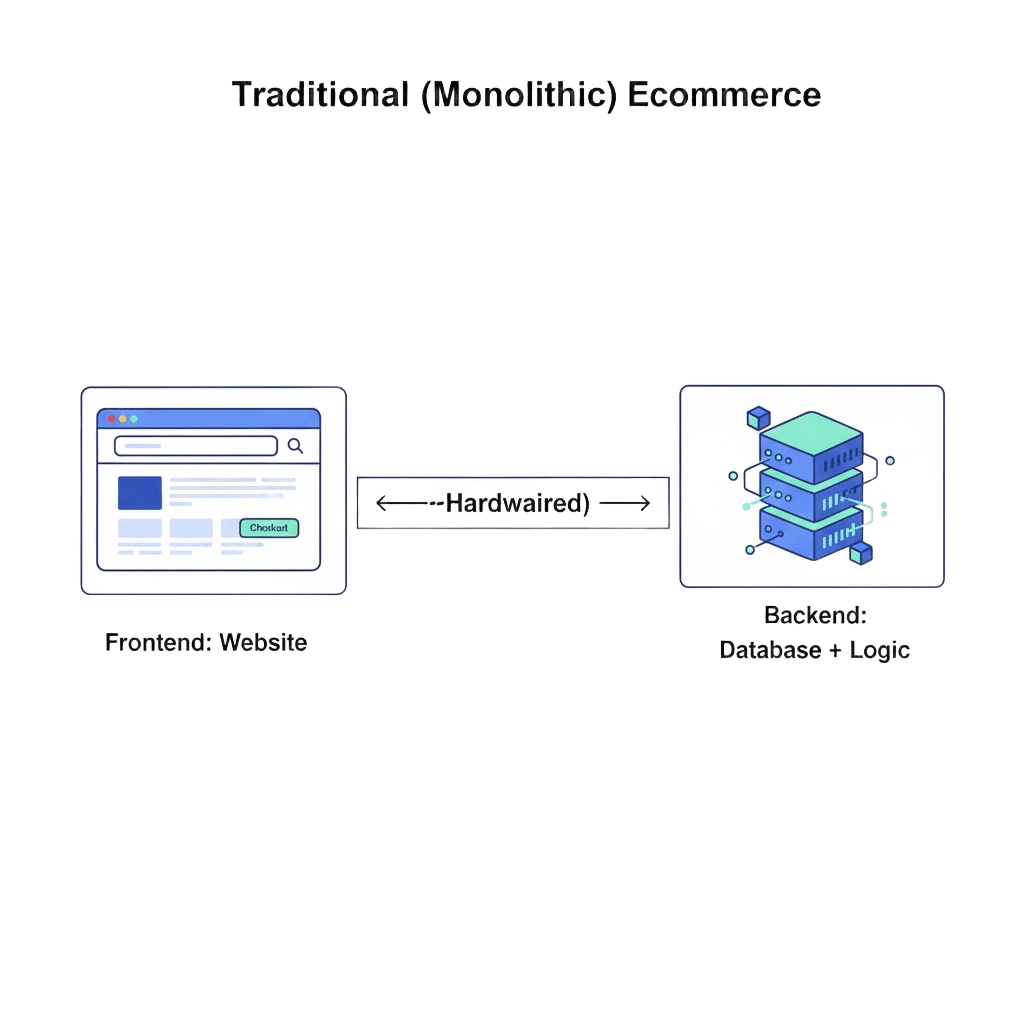
In traditional eCommerce websites, the frontend and backend technologies are tightly coupled and often belong to the same codebase. For example, if you want to publish content on a new screen such as smartwatch or smartphone, you will have to build a new separate backend system.
However, with headless eCommerce, the experience turns entirely different.
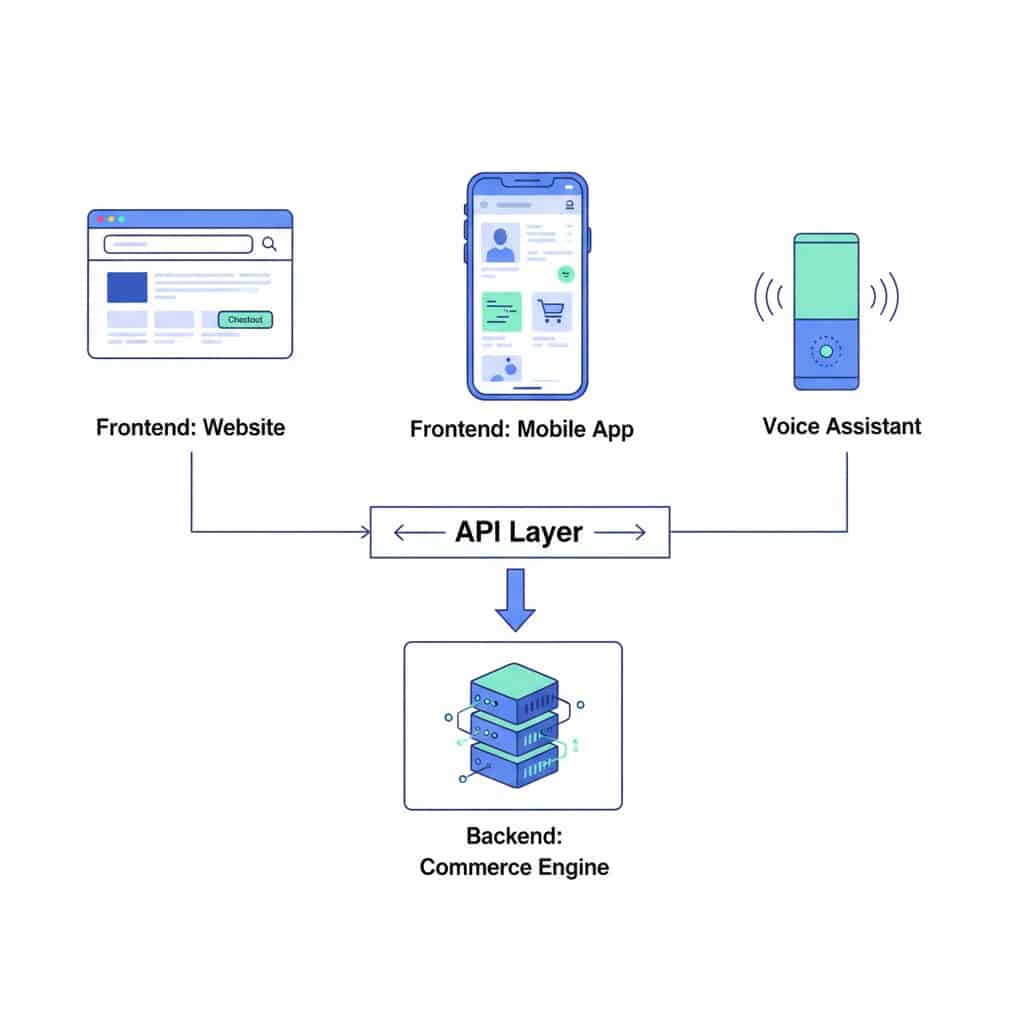
At its core, headless eCommerce is designed to be flexible.
The backend is a powerful data engine which handles products, pricing, orders and customers without being tied to how everything appears on the surface.
That setup alone makes omnichannel marketing feel natural.
In a headless eCommerce pattern, the same commerce backend powers your entire website, mobile app, in-store screen or even future touchpoints which you haven’t most likely planned.
As far as the front-end is concerned, developers have creative freedom. They can use any software platform of their choice like React, Vue, or Flutter to design custom experiences.
In essence, headless eCommerce is an architecture, not a single product.
How Headless eCommerce Works?
Well, it’s time you forget complex codes & diagrams.
At its core, headless commerce is all about creating an invisible layer between what your customer sees and where your business data lives.
Let’s walk through that conversation, step-by-step, as if we’re watching an order happen behind a two-way mirror.
Imagine a customer browsing a headless powered fashion website.
Step 1: The Digital Trigger – A customer clicks “Add to Cart” on a beautifully animated product page. This frontend, built with modern tools like React or Next.js for speed, doesn’t handle shopping cart logic itself. It simply captures the action and gets ready to pass it along.
Step 2: The API Messenger – The frontend sends a clean, standardized request through an API to the backend. Think of it like a digital order slip that says, “Please add Product ID 456 to Cart XYZ.” The API acts as a shared language, making sure both sides stay perfectly in sync.
Step 3: The Engine Room – The backend commerce engine, using platforms like commercetools, Shopify Plus in headless mode, or Elastic Path, receives the request and goes to work.
In milliseconds, it checks live inventory, applies customer-specific pricing, updates the cart, and calculates taxes. Once done, it packages everything into structured data.
Step 4: The Return Flight – That data package travels back to the frontend through the same API. Instead of sending a full webpage, the backend returns only what’s needed, such as cart totals and item counts.
Step 5: The Instant Update – The frontend uses this data to update only the relevant parts of the page, like the cart icon or mini-cart sidebar. The result feels fast and app-like, with no full page reloads breaking the flow.
The Omnichannel Magic
This is where the real value shows up.
The backend commerce engine is channel-agnostic. If the customer opens your mobile app later, that app makes the same API call to the same backend and pulls the exact same cart data. If they use a voice assistant and ask to add an item, the voice interface sends a similar request and gets the same outcome. Even an in-store kiosk taps into the same product catalog and inventory pool.
What Are the Benefits of Headless eCommerce?

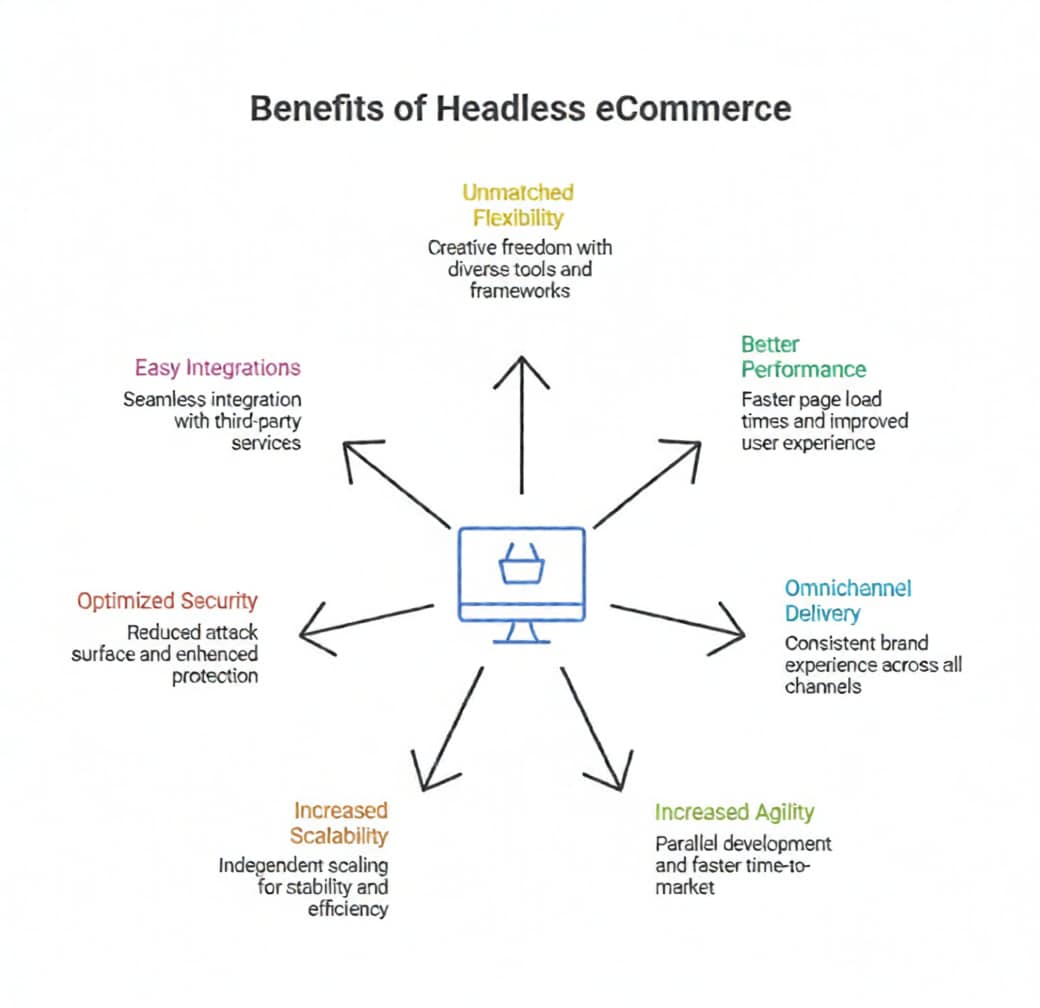
Some of the major benefits of investing big in headless eCommerce are:
Unmatched flexibility and Customization – The core benefit of a headless eCommerce system is how it brings creative freedom. If you’re an eCommerce developer, you can use different tools and many different frameworks like React, Vue or Angular to build unique user interfaces without being constrained by the templates of monolithic systems. It ultimately makes it easier to personalize customer experience.
Better Performance & Speed – When you invest in decoupling the architecture, you can decide on whether you want the frontend to be made “lighter” and better optimized for speed or not. Ultimately, it results in faster page load time and improves the overall end customer user experience. You will also see lower bounce rates which eventually increase your SEO presence and help you appear in searches.
Omnichannel Delivery Content – You can store data in a central repository which you can later on distribute via APIs to any channel or device of your choice. Content delivery can be done through websites, mobile apps, in-store kiosks, social media channels and IoT devices. It allows a consistent brand experience delivering it everywhere especially where the customers interact with the brand most.
Increased Agility and Faster Time-to-Market – With headless eCommerce, you can use frontend and backend development teams to work in parallel without getting too dependent on release cycles. It creates a parallel workflow which eventually decreases development bottlenecks and allows businesses to launch better features, conduct A/B tests and adapt to changing market trends much more efficiently.
Increased Scalability – Every layer of headless eCommerce possesses the capability to scale independently based on rising demand. It means you observe less spike in traffic on the frontend during major events. Increased scalability further instills that you don’t necessarily need to scale up the entire backend which ultimately ensures stability and enhances the operational efficiency for eCommerce.
Better Optimized Security – By placing headless eCommerce, it separates the frontend from the backend which means the content database is not directly exposed to the public user interface. As a result, it minimizes the overall attack surface and increases against security threats such as other cybersecurity threats and DDoS attacks.
Easy Integrations – Headless architectures are typically “API-first” which makes them straightforward to integrate with some of the best-of-breed third-party services such as Customer Relationship Management (CRM) systems, payment gateway integrations or analytics tools. It creates a best-of-breed tech stack personalized to meet specific business requirements making headless eCommerce a class-apart.
What are the Disadvantages of Headless eCommerce?
So here’s the thing, headless eCommerce sounds like it’s the future, and it is… but it’s not all unicorns and viral growth charts. Here’s the tea on what might actually slow you down or hit your wallet harder.
Higher Upfront Cost
Headless isn’t cheap out of the box. You’re basically building a custom stack which means handling bigger bills for dev teams, platform licenses and other relative launch resources. It includes stuff like frontend development cost, backend development cost, APIs & integration costs, altogether.
If you’re bootstrapped, that initial hit can sting.
More Technical Muscle Required
Unlike plug-and-play SaaS themes, headless needs engineers who speak API, GraphQL, and modern JS frameworks. If your dev team is not already stacked with technical talent, you will need to hire more people or outsource, which ultimately drives cost and increases the technical complexity up.
Longer Implementation Time
In headless eCommerce, everything’s modular, which means you have to build specific connections between systems (CMS → storefront → checkout → personalization layers). This process for monolithic systems can take anywhere from weeks up to months. You’re not just flipping a theme, you’re architecting.
More Maintenance Work
Updates aren’t always one switch.
Any change across your stack, whether it’s coming from CMS tweaks or checkout upgrades, you may need coordination across multiple parts. That includes more testing and ultimately more upkeep.
Not Always Worth It for Small Catalogs
If you’re a niche shop with a simple product lineup and low traffic, the ROI of going headless might not justify the effort. Traditional platforms can still crush it for straight-up selling.
Who Should Choose Headless eCommerce?
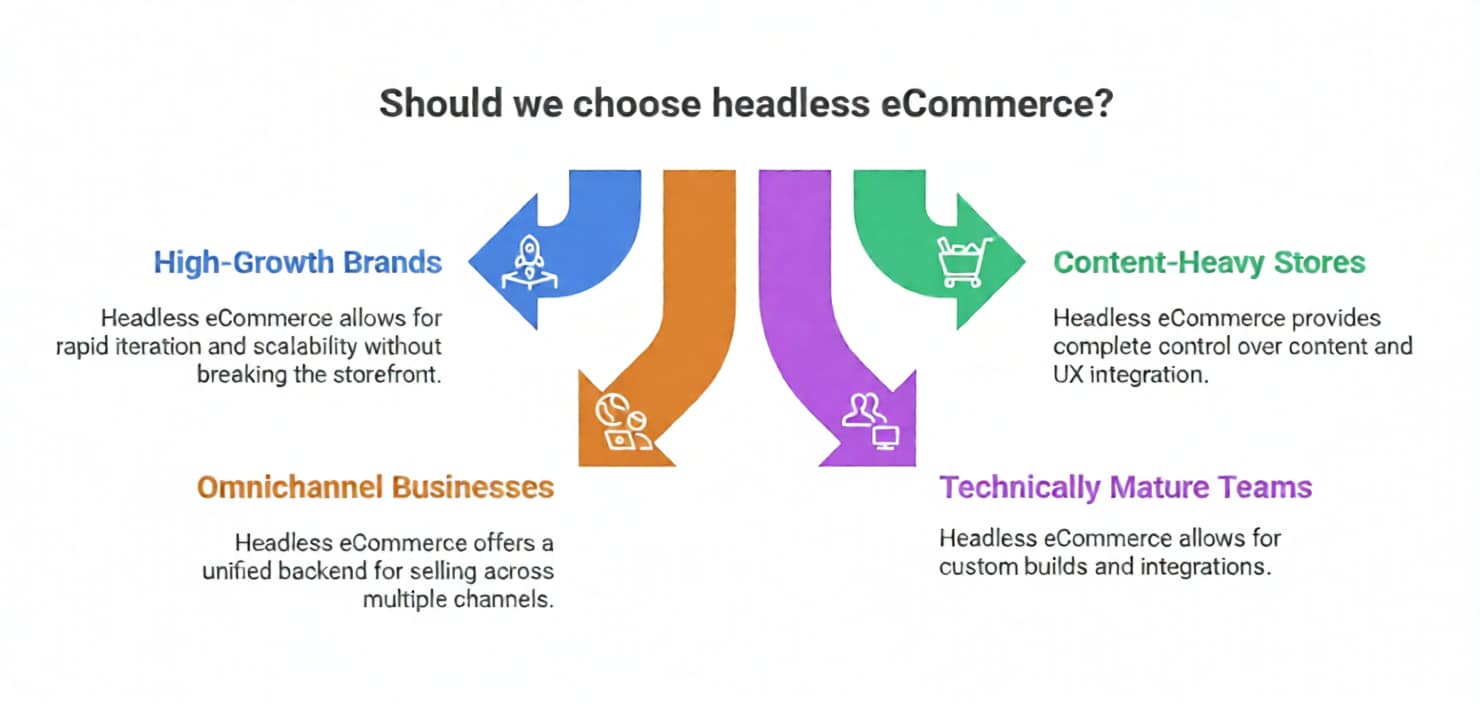
This is where the hype stops and the strategy begins.
Headless eCommerce isn’t for everyone, but for the right businesses, it’s a serious growth unlock.
High-Growth Brands
If your brand is scaling fast (traffic spikes, new markets, aggressive roadmaps), headless gives you room to breathe. You’re not boxed into rigid templates or performance ceilings.
You can iterate fast without breaking your storefront every time. Headless eCommerce is best for brand growth, seasonal spikes or any frequent UX experiments.
Content-Heavy or Experience-Driven Stores
If you want to capitalize on storytelling, editorial content, personalization, or immersive UX, headless eCommerce comes as a no-brainer. You get complete control over how content and commerce integrates.
There are no awkward workarounds.
It shows this process is best for DTC brands, lifestyle products, luxury products, media-led commerce or brands which are competing with each other based on experience.
Businesses Selling Across Multiple Channels
If you’re a business selling across different channels, headless eCommerce offers you an easy-to-use interface to sell products on web, mobile apps, marketplaces, social commerce, kiosks or IoT.
Headless lets one backend power everything.
It means there are no duplicate systems, no messy sync issues or anything of the sort.
If you’re an omnichannel brand, a global seller or a business looking to expand operations beyond just a website, then headless eCommerce becomes the perfect tool to market across channels.
Teams with Technical Maturity
Do you already have developers in-house? Are you working closely with a solid tech partner? Headless eCommerce can bring a lot of store flexibility. Your team can choose the best tool, frameworks & integrations, not only what the platform provides. It brings technical maturity for companies who are comfortable working with APIs, modern frameworks and custom eCommerce builds.
Quick Reality Check – Is Headless eCommerce Right For You?
Here’s a simple chart to give you a brief information on how headless eCommerce fits.
| Business Type | Headless eCommerce Fit | Why It Works |
| Early-stage startup | ❌ Low | High cost + complexity outweigh benefits |
| High-growth DTC brand | ✅ High | Performance, scalability, UX freedom |
| Content-first brand | ✅ High | Seamless CMS + commerce integration |
| Single-channel store | ⚠️ Medium | May be overkill if needs are simple |
| Omnichannel business | ✅ Very High | One backend, multiple frontends |
| Non-technical team | ❌ Low | Requires ongoing technical involvement |
| Tech-savvy organization | ✅ Very High | Maximum flexibility and long-term ROI |
When Headless Is Overkill
Let’s be real, headless eCommerce is powerful.
But power isn’t always what you require. In some cases, it’s just the necessary weight you carry.
Calling this out actually makes your guide more trustworthy.
Early-Stage Stores
If you’re still jumbled up in product validation, audience selection or pricing plans, headless eCommerce is probably too much too soon. You don’t need architectural freedom when you’re still figuring out what sells.
Simple Catalogs
Selling a small number of products with straightforward checkout flows? But here’s the thing! Headless won’t magically improve conversion rate. You can have a theme-based storefront to get you 80% of value.
Limited Budgets or Dev Support
Headless isn’t set-it-and-forget-it. Without ongoing dev support, updates, experiments, and fixes can slow you down, or worse, break things. You can choose a managed eCommerce platform to support your stack.
Headless vs Traditional eCommerce: Quick Comparison
Here’s a side-by-side moment where everything clicks. Instead of just discussing theory, this shows how both models behave differently from each other in the real world.
| Category | Traditional eCommerce (Monolithic) | Headless eCommerce |
| Architecture | Frontend and backend are tightly coupled in one system | Frontend and backend are decoupled and communicate via APIs |
| Flexibility | Limited to platform themes, templates, and plugins | Total creative freedom across UI, UX, and interactions |
| Frontend Customization | Restricted by platform rules and rendering engines | Fully customizable using React, Vue, Next.js, Flutter, etc. |
| Performance & Speed | Slower due to server-side rendering and full page reloads | Faster, app-like experience with partial updates and caching |
| Scalability | Scaling often means upgrading the entire platform | Each layer scales independently based on demand |
| Time-to-Market | Faster initial launch, slower long-term innovation | Slower setup, but rapid feature releases once live |
| Omnichannel Support | Primarily designed for web storefronts | Built for web, mobile apps, kiosks, IoT, voice, and future channels |
| Content Management | Content and commerce are tightly linked | CMS and commerce work independently yet seamlessly |
| Marketing Agility | Campaign changes may affect core system stability | Marketing teams can launch experiments without backend risk |
| SEO Control | Limited technical SEO control | Full control over SEO, page speed, and structured data |
| Integration Capability | Plugin-based, often limited or vendor-locked | API-first, easy integration with best-of-breed tools |
| Security Surface | Larger attack surface due to exposed frontend-backend link | Reduced exposure with backend hidden behind APIs |
| Development Workflow | Sequential development cycles | Parallel frontend and backend development |
| Maintenance Effort | Simpler maintenance under one platform | Requires ongoing coordination across multiple systems |
| Upfront Cost | Lower initial investment | Higher initial cost due to custom build |
| Long-Term Cost Efficiency | Costs rise with scaling and platform limitations | Better ROI at scale despite higher setup cost |
| Technical Dependency | Minimal technical expertise required | Requires strong developer involvement |
| Best Fit For | Small to mid-sized stores, simple use cases | High-growth, omnichannel, experience-led brands |
How Much Does Headless eCommerce Cost?
Here’s a practical breakdown for cost considerations for headless eCommerce. Whether it’s dev or hosting, or any other type of integrations, here’s the complete projection table based on industry-level research.
Here’s What You’re Actually Paying For…
Development
This is the big one, because headless means building:
- A custom frontend (React/Next, Vue/Nuxt)
- API layers between front and back
- Specialized features you don’t get out of the box
- QA, testing, UX polish
Here’s an estimated range based on complexity & experience level.
| Tier | Description | Typical Range (USD) |
| Basic Headless | Minimal UI, simple product pages | $15,000–$40,000 |
| Mid-Level Custom | Enhanced UX, advanced filtering, some integrations | $50,000–$100,000 |
| Enterprise Headless | Multi-channel, global CDN, custom workflows | $100,000–$150,000+ |
| Large Enterprise/Multi-Region | Full microservices + omnichannel | $250,000–$600,000+ |
Enterprise-level headless projects can hit up to seven figures when adding advanced personalization, multi-site support or complex integrations.
Hosting & Infrastructure
Unlike traditional all-in-one platforms, headless stores require separate hosting for:
- Frontend (Next/Vue app)
- Backend APIs
- Databases, edge caching
- CDN usage
| Hosting Type | Monthly Cost | Notes |
| Basic CDN + small app hosting | $100–$300 | Small stores or low-traffic |
| Cloud VPS + CDN | $500–$2,000 | Mid-sized businesses |
| Enterprise cloud (AWS/GCP + autoscale) | $3,000–$10,000+ | Heavy traffic + global delivery |
Traffic spikes can often happen during holiday launches while working on new campaigns.
Integrations
Headless excels because you plug whatever services you want, but those integrations cost both to build and maintain.
| Integration Type | Typical Cost |
| Payment gateway | $1,500–$7,500 |
| CRM (HubSpot, Salesforce) | $3,000–$15,000+ |
| ERP sync | $10,000–$50,000 |
| PIM/CMS | $5,000–$20,000+ |
| Analytics + personalization | $3,000–$20,000 |
Each custom API adds dev and maintenance overhead.
Maintenance & Ops
You’re not done once launched, headless needs ongoing maintenance & support which includes:
- DevOps updates & security
- Framework updates
- New feature requests
- Monitoring & bug fixes
| Service | Monthly Cost |
| Basic maintenance | $1,500–$3,000 |
| Mid-tier agency retainer | $3,000–$10,000 |
| Enterprise support | $10,000+ |
Cost Projection Over Time (5-Year Budget)
Here’s a simplified projection table for the launch of headless eCommerce spread over a 5 year timeline.
A) Mid-Sized Headless eCommerce (e.g., $1M–$5M revenue)
| Category | Year 0 (Setup) | Year 1 | Year 2 | Year 3 | Year 4 | Year 5 |
| Development | $70,000 | — | — | — | — | — |
| Hosting | $1,500/m ($18k) | $18k | $22k | $25k | $28k | $30k |
| Maintenance | $2,500/m ($30k) | $30k | $35k | $40k | $45k | $50k |
| Integrations | $20k | $10k | $10k | $10k | $10k | $10k |
| Improvements & Enhancements | $15k | $20k | $25k | $30k | $30k | $35k |
| Total | ~$133k | ~$58k | ~$92k | ~$105k | ~$113k | ~$125k |
You can see how costs shift from upfront dev to steady ops and evolve eventually over time.
Enterprise Headless (High customization + Global)
| Category | Year 0 | Year 1 | Years 2-5 Avg |
| Development | $300,000 | — | — |
| Hosting | $8,000/m ($96k) | $96k | $110k |
| Maintenance | $10k/m ($120k) | $120k | $140k |
| Integrations | $60k | $20k | $20k |
| Innovation / AI / Personalization | $100k | $80k | $80k |
| Annual Run-rate | $300k+ | ~$336k | ~$350k |
Headless isn’t just about cost, it’s an investment in flexibility, performance and competitive advantage. Companies who leverage this path often measure ROI on performance gains, operational flexibility and reduced technical debt.
For example, if pages are well optimized and have faster load times, they lead to higher conversion reported up to 15-40% or even more. Complexity drives more dev & ops overhead than traditional platforms, especially if you don’t have clear use cases first.
SEO, Performance & UX in a Headless Setup
The big concern everyone has (and for good reason).
Headless doesn’t magically fix SEO or UX. It amplifies whatever you build, good or bad.
Done right, it’s a performance monster. Done wrong, it’s an expensive ghost town.
How Headless Helps SEO (When Done Right)
When implemented correctly, headless architecture becomes a serious performance upgrade. Modern frontend frameworks like Next.js and Nuxt support server-side rendering (SSR) and static site generation (SSG), which means pages are either pre-rendered or served instantly from the edge. The result is noticeably faster load times, especially on mobile devices where performance matters most. When combined with proper caching and a global CDN, Core Web Vitals typically see a solid lift. Faster pages don’t just feel better to users; they consistently convert better, and Google’s ranking systems reward that speed advantage.
From an SEO point of view, headless removes many of the limitations imposed by traditional themes and monolithic platforms. Teams gain full control over metadata, structured data, URL structures, and internal linking strategies. Instead of shipping bloated HTML weighed down by unnecessary scripts, headless setups can output clean, optimized markup. Pages can be pre-rendered specifically for search engines, eliminating the risk of relying solely on client-side JavaScript to deliver critical content.
In short, SEO becomes intentional rather than constrained.
But if there’s one thing, user experience is where headless eCommerce truly flexes.
Without being tied to rigid templates, teams can design custom checkout flows, immersive product journeys, and seamless blends of content and commerce. Personalization becomes easier to implement and scale, without resorting to fragile theme hacks or plugins. This freedom allows brands to design experiences around real user behavior, not around what a platform happens to allow.
How Headless Hurts SEO (When Done Wrong)
The same flexibility that makes headless powerful is also where teams can get into trouble. When sites rely entirely on client-side rendering, search engines may struggle to properly index content, leading to visibility issues that are hard to diagnose after launch. During migrations, missed or misconfigured redirects can cause rankings to drop almost overnight, wiping out years of organic growth in a matter of days.
Performance issues can also creep in quietly. A weak caching strategy might make the site feel fast in one region but painfully slow in another, especially without a well-configured CDN. In many failed implementations, developers optimize for modern tooling or flashy animations instead of crawlability, accessibility, and real-world performance. Headless doesn’t forgive shortcuts. It adds power, but it also demands discipline, planning, and a strong understanding of both users and search engines.
Headless SEO Checklist
- SSR / SSG Enabled – Make sure pages are server-side rendered or statically generated so search engines can read your content instantly.
- Core Web Vitals Targets – Optimize LCP, INP, and CLS to ensure fast, smooth user experience that Google rewards.
- Redirect Strategy – Plan URL redirects carefully during migrations to preserve traffic and rankings.
- Schema & Metadata Control – Implement structured data for products, FAQs, and breadcrumbs to boost SERP visibility.
- Log File Monitoring – Track how search engines crawl your site to catch indexing issues and wasted crawl budget early.
Migration Checklist – Questions to Ask Before Going Headless
This is the decision filter. Answer these honestly.
1. Do You Actually Need Omnichannel Right Now?
Headless is perfect if you’re selling across:
- Website
- Mobile app
- Marketplaces
- In-store screens
- Social commerce
If you’re just running one basic storefront, headless may be overkill for now. Timing matters.
2. Can Your Team Support It?
Headless is not “set it and forget it.”
Ask yourself:
- Do you have frontend devs who understand React/Vue?
- Can someone manage deployments, APIs, and performance?
- Are you okay relying on an agency long-term if needed?
If the answer is “no,” that’s not a dealbreaker, but it does affect cost and risk.
3. What’s the Actual Business Goal?
This is the most skipped question.
Headless makes sense if your goal is:
- Faster site will mean higher conversions
- Unique UX that differentiates you
- Scaling without replatforming every 2 years
- Personalization at scale
Headless does not make sense if:
- You just want a redesign
- Your traffic is low and stable
- Speed and UX aren’t current pain points
Tech should serve strategy, not ego.
4. Are You Ready for Migration Complexity?
Migration isn’t just moving products.
You’ll need to plan for:
- URL mapping & redirects
- SEO parity (or improvement)
- Content restructuring
- Analytics re-implementation
Skipping this step is how brands lose years of organic growth in weeks.
5. Is the ROI Clear?
Ask:
“Will this unlock revenue, scale, or speed we can’t get otherwise?”
If the answer is vague, pause.
If the answer is specific, measurable, and tied to growth, you’re ready.
FAQs
- What does headless mean in eCommerce?
Headless eCommerce is an architecture where the frontend (customer-facing layer) is decoupled from the backend (commerce engine). They communicate via APIs, giving full flexibility in designing experiences across web, mobile, and other channels. - What is an example of headless eCommerce?
Nike uses a headless setup, running custom frontend experiences while a centralized backend manages products, inventory, and checkout. - What are the most popular headless eCommerce platforms?
Commercetools, Shopify Plus (headless mode), BigCommerce, Adobe Commerce (Magento), and Elastic Path. - Is Shopify headless eCommerce?
Shopify can operate headless via its Storefront API, allowing developers to build custom frontends while Shopify handles backend operations. - Is headless eCommerce good for SEO?
Yes, if implemented correctly with server-side rendering (SSR), static site generation (SSG), proper metadata, and clean URL structures. Poor client-side-only setups can hurt SEO. - Is headless eCommerce worth it?
It’s worth it for high-growth, omnichannel, or content-heavy brands needing flexibility, speed, and scalability. Small stores with simple catalogs may not see ROI. - Is Figma a headless CMS?
No. Figma is a design tool, not a content management system. It cannot serve content to multiple channels via APIs.
Want to learn about headless CMS?
Read More: How to Create OmniChannel Experience with Headless CMS?
Final Verdict: Should You Go Headless?
Headless eCommerce is more than just chasing modern tech, it has outgrown to solve real growth problems that many eCommerce entities today are experiencing.
If your eCommerce store has already outgrown standard templates, if it struggles with performance, or your aim is to set up an omnichannel presence, headless makes the perfect sense.
It brings flexibility, speed and long-term ROI which matters more than just a quick setup or a strong move.
Are you thinking it through? Well, you don’t have to do it alone.
At Branex, our eCommerce development team can help you decide, design and build the perfect headless eCommerce solution, and guess what! We do it without overengineering it.